📝 Key Takeaways: Master Wang provides hands-on techniques for Corner Cleanup in steep regions using Siemens NX. This in-depth analysis covers the pros and cons and application scenarios of One-Way and Zigzag machining modes, emphasizing the importance of Depth Machining and smooth toolpaths. It will help you optimize your toolpaths, improve machining efficiency and part quality, and avoid pitfalls not found in textbooks.
Hello everyone, Master Wang here! Today, we’re skipping the fancy theories and getting straight to the point. The job in front of us is a classic case of Corner Cleanup in steep regions – these areas are notorious for issues and truly test your skills. Listen up, because today we’re going to thoroughly discuss the ins and outs of Corner Cleanup and different machining modes.
Default Zigzag Machining: What’s the Problem?
First, let’s do a standard operation. Pick any tool, select the area for Corner Cleanup, and generate a program. Watch closely, I’ll select the region faces to be cleaned. Right-click, select Tangent Faces – you’re all familiar with that.
Observing the Default Toolpath: Drawbacks of Zigzag Machining
Now, I’ll run this with the default Zigzag machining mode. Since there are many faces, the calculation might take a bit – don’t rush it.
See that? As soon as the toolpath is generated, the problem becomes obvious. In these steep regions, the tool cuts back and forth, leading to uneven cutting forces. Don’t just rely on the smooth software simulation; once you run it on the machine, you’ll find:
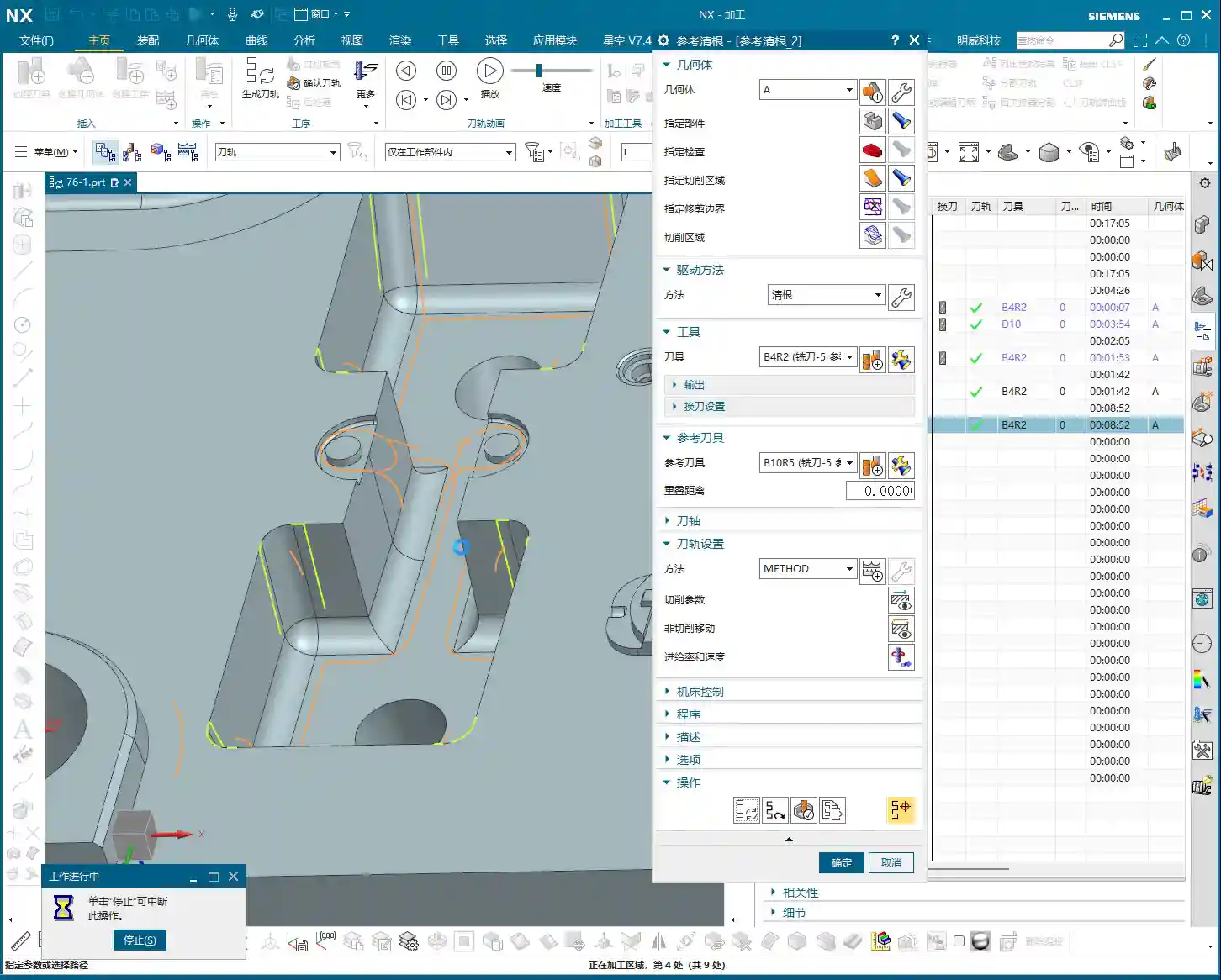
- Prone to heavy cuts/Tool Dig-in: When the tool reverses direction, the cutting force changes instantaneously, often causing the tool to dig in sharply. At best, it leaves tool marks; at worst, it chips the insert or even scraps the part!
- Poor Surface Quality: With back-and-forth cutting, especially on steep slopes, the tool can easily slip or, when reversing direction, leave unsightly “fish-scale patterns” or “pitting.”
- Shorter Tool Life: Constantly enduring impacts and changes in direction accelerates tool wear, naturally shortening its lifespan and increasing your costs, doesn’t it?
So, while Zigzag machining might be acceptable in flat areas, encountering Corner Cleanup in steep regions with it is practically asking for trouble.

Preferred for Steep Regions: One-Way Machining
For these steep Corner Cleanup regions, we need a different approach. In my experience, One-Way machining is the way to go!
Advantages and Setup of One-Way Machining
Alright, I’ll change this machining mode to One Way. We’ll set the depth to 0.2mm. Don’t forget, for Corner Cleanup, you need a small Depth of Cut (DOC) to ensure accuracy and surface finish. Then, regenerate the toolpath.
See that? Now the tool moves in only one direction – for instance, cutting from top to bottom. After completing a pass, it retracts and rapids back to the start point to begin the next pass. While it appears to have more Air Cuts and might seem less efficient, the reality is:
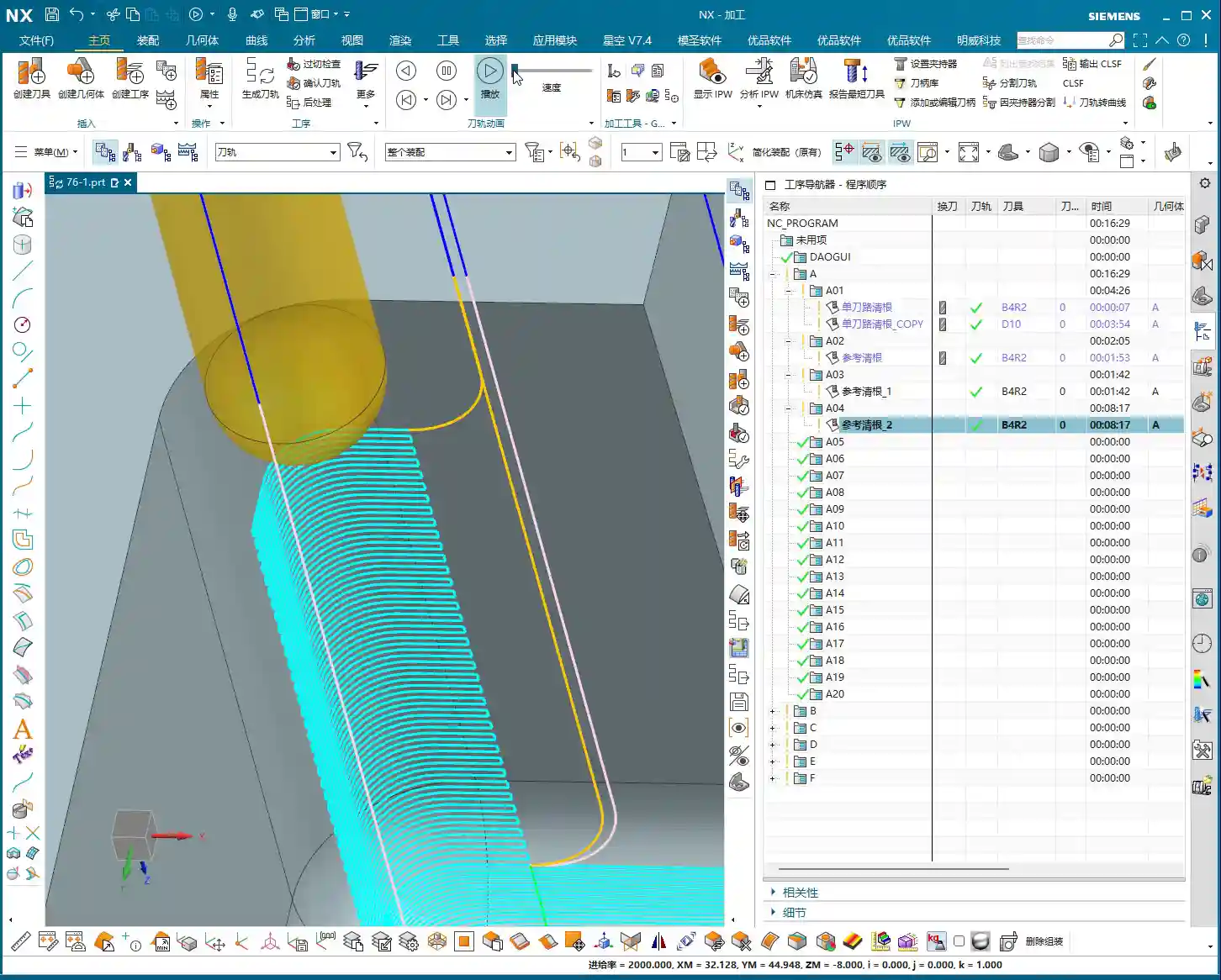
- High Machining Stability: The tool is consistently loaded in one direction, leading to a very stable machining process, less prone to chatter or chipping.
- Excellent Surface Finish: One-Way machining prevents the tool from reversing direction during cutting, eliminating tool marks and imperfections caused by direction changes. This naturally results in a superior surface finish.
- Extended Tool Life: Reducing the impact from direction changes leads to more even tool wear and significantly extends tool life.
In steep regions, machining stability and surface quality are paramount. The minor loss from those Air Cuts is easily recuperated by improving yield and tool life. You need to crunch these numbers carefully!

“Zigzag Upward”? You’re Asking for Trouble!
Some of you might ask, what about Zigzag Upward or Zigzag Parallel to Tool Axis? I’m telling you, for steep regions, these modes should be used with extreme caution, or frankly, not at all!
Look closely at such a toolpath: when it cuts upward, the tool is essentially climbing against the cutting direction, aggressively “biting” into the material. How terrible are those cutting forces? It’s highly prone to chatter, chipping, and can even scratch the part surface. Don’t just rely on software simulations; observe the cutting sparks and chips – they’ll tell you the real story.
If you absolutely must use a zigzag approach, at least use the Perpendicular to Tool Axis mode, ensuring the tool always cuts down the material, which provides much better cutting forces. But even then, it’s still fundamentally zigzagging, and risks remain at corners.
Master Wang’s Pro Tips: Combining Depth Machining and Smoothness
Now, I’m going to teach you some practical tips you won’t find in textbooks.

The Clever Application of Depth Machining
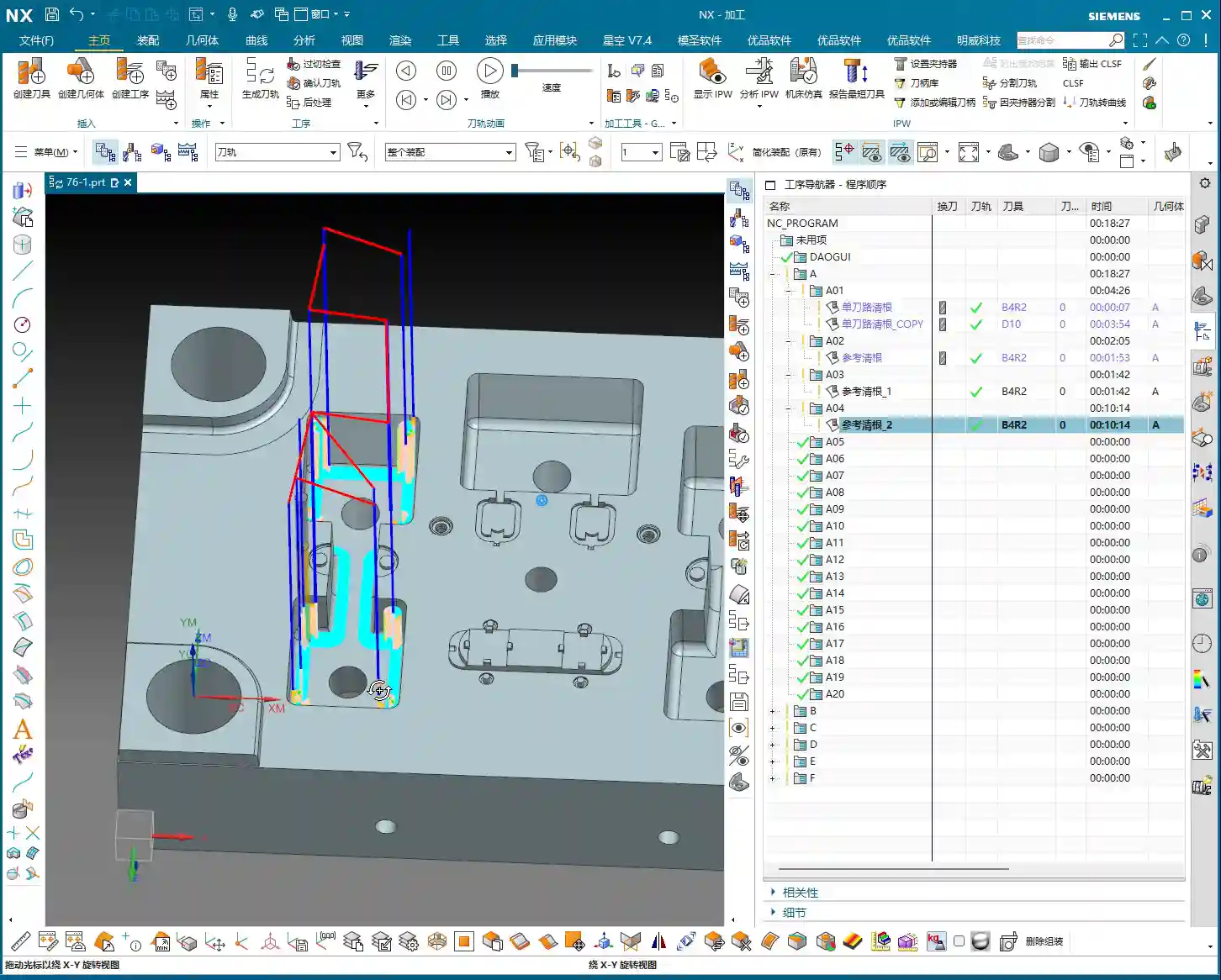
Sometimes, relying solely on Corner Cleanup operations might not be flexible enough, especially when encountering both steep and deep Corner Cleanup regions. In such cases, I lean more towards using the Depth Machining function.
Depth Machining itself is designed for steep walls. It offers better control over the tool’s cutting in the Z-axis direction, and when combined with One-Way machining mode, it can generate highly stable and efficient toolpaths. It handles depth more effectively, making the toolpaths appear more smooth and continuous, rather than just focusing on localized areas like simple Corner Cleanup.
Ultimate Optimization: One-Way Machining + Smooth
However, if you want to perfect steep regions within a Corner Cleanup operation, my ultimate secret is this: use One-Way machining mode, and then make sure to activate the Smooth function!
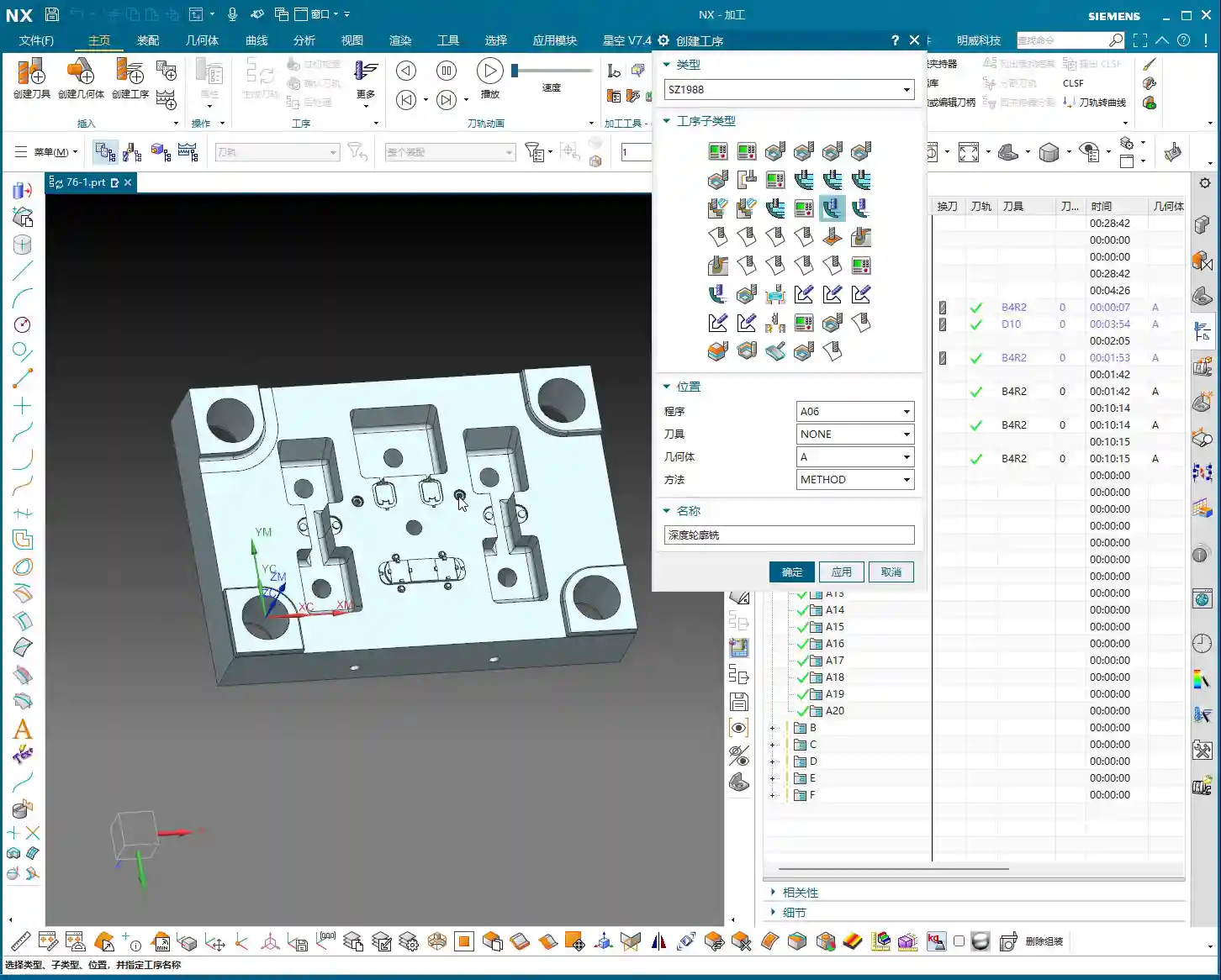
Let me show you. When you combine One-Way machining with the Smooth function enabled, and then regenerate the toolpath, you’ll observe:
- More Refined Toolpaths: What might have been subtle jumps or unevenness before now becomes incredibly smooth and flowing, as if hand-drawn.
- Increased Machining Stability: The Smooth function optimizes tool engagements, retracts, and connection paths, reducing unnecessary sharp turns and impacts, leading to a much more stable cutting process.
- Exceptional Surface Finish: Smooth toolpaths translate to more consistent cutting, and the part’s surface finish and texture will achieve a very high standard.
That Smooth function isn’t just for show; it can be a real lifesaver in critical situations! Especially for parts with tight tolerances and demanding surface finish requirements, One-Way machining combined with Smooth is almost always my first choice. Try it, and you’ll see. This is veteran experience; you won’t necessarily find such detailed explanations in textbooks.
Flexible Combinations, Context-Specific Application

So, Corner Cleanup has its applications, and Depth Machining has its advantages. It’s not about one being definitively better than the other; the key is flexible combination and adapting to the situation. It’s like going to battle – you can’t rely on just one weapon.
- Corner Cleanup operations: Typically used for final finishing, thoroughly cleaning out those small corners and root areas left after roughing and semi-finishing. It focuses on local details.
- Depth Machining: Is more suitable for areas with strong overall form, significant depth, and steep slopes. It can be used as a finishing pass before Corner Cleanup, or independently for machining deep cavities and steep walls.
In practical application, you might find that toolpaths achievable with Corner Cleanup might not be possible with Depth Machining, and vice-versa. Therefore, they are not mutually exclusive but rather complementary and work in synergy. Remember, no method is inherently good or bad; it’s about how well you apply it! Practice more, ponder more, and the machine will naturally obey your commands!
Summary: Pitfall Avoidance Guide
- For Corner Cleanup in steep regions, use Zigzag machining with caution: Unless it’s a flat area, the Zigzag mode can easily lead to uneven tool loading, causing tool marks, chipping, or poor surface quality.
- Prioritize One-Way machining: For steep regions, the One Way mode ensures machining stability and surface finish quality. Even with more Air Cuts, it offers greater long-term benefits.
- Enable the Smooth function: When using One-Way machining mode, be sure to enable Smooth. This significantly optimizes toolpaths, enhancing surface quality and tool life. This small detail can save you a lot of trouble.
- Depth Machining is a powerful tool: For steep and deep regions, consider using Depth Machining. It offers distinct advantages when handling deep cavities and steep walls.
- Understand the purpose of different commands: Corner Cleanup is primarily for final finishing, cleaning tight corners. Depth Machining can be used for intermediate finishing or large steep walls. They are partners, not rivals.
- Practice makes perfect: No amount of theory compares to hands-on experience. Grab any model, click around, generate several toolpaths, compare them, and you’ll uncover the secrets.
That concludes today’s lesson. I hope you can absorb and apply these practical experiences. Next time, we’ll discuss the intricacies of multi-toolpaths – that’s a whole new ballgame!
👤 About the Author:
The author is a veteran CNC machining professional with 15 years of industry experience, specializing in UG NX programming. This article is an original work representing personal practical insights.
⚠️ Copyright Notice: Unauthorized reproduction or distribution without prior communication is strictly prohibited.