📝 Key Takeaways: Master Wang will take you through a practical breakdown of the “Point-on-Curve Engraving/Line Engraving” function within NX Fixed Contour Milling to overcome planar machining limitations and easily achieve precise 3D engraving on complex surfaces. Master tool selection, negative stock depth control, and multi-pass strategies to uncover practical tips not found in textbooks, and help you become a CNC programming master!
Master Wang Speaks: Practical Applications of Point-on-Curve Engraving
Listen up, youngsters. Today, I, Master Wang, will properly explain the “Point-on-Curve Engraving” and “Line Engraving” functions within NX Fixed Contour Milling. Don’t underestimate this feature; it’s a powerful tool for engraving text and lines on complex surfaces, far superior to those 2D engraving methods that only “scratch the surface” on flat planes!
Simply put, “Point-on-Curve Engraving” is the “upgraded 3D version” of the “Profile Engraving” we learned before. Standard profile engraving is limited to flat surfaces, but “Point-on-Curve Engraving”? It allows you to engrave text and lines on curved surfaces, inclined surfaces, or any lines on 3D geometries – now that’s real skill! Don’t just stare at the perfectly flat machining surfaces in the software; how many actual parts have that many flat areas for you to work with? Whether you’re engraving a company logo, product model, or alignment lines, this method delivers high efficiency and excellent results.
Operation Core: Select Face, Select Curve, 3D Engraving Made Easy
Using this function is actually quite simple, with two core steps: First select the face, then select the curve.
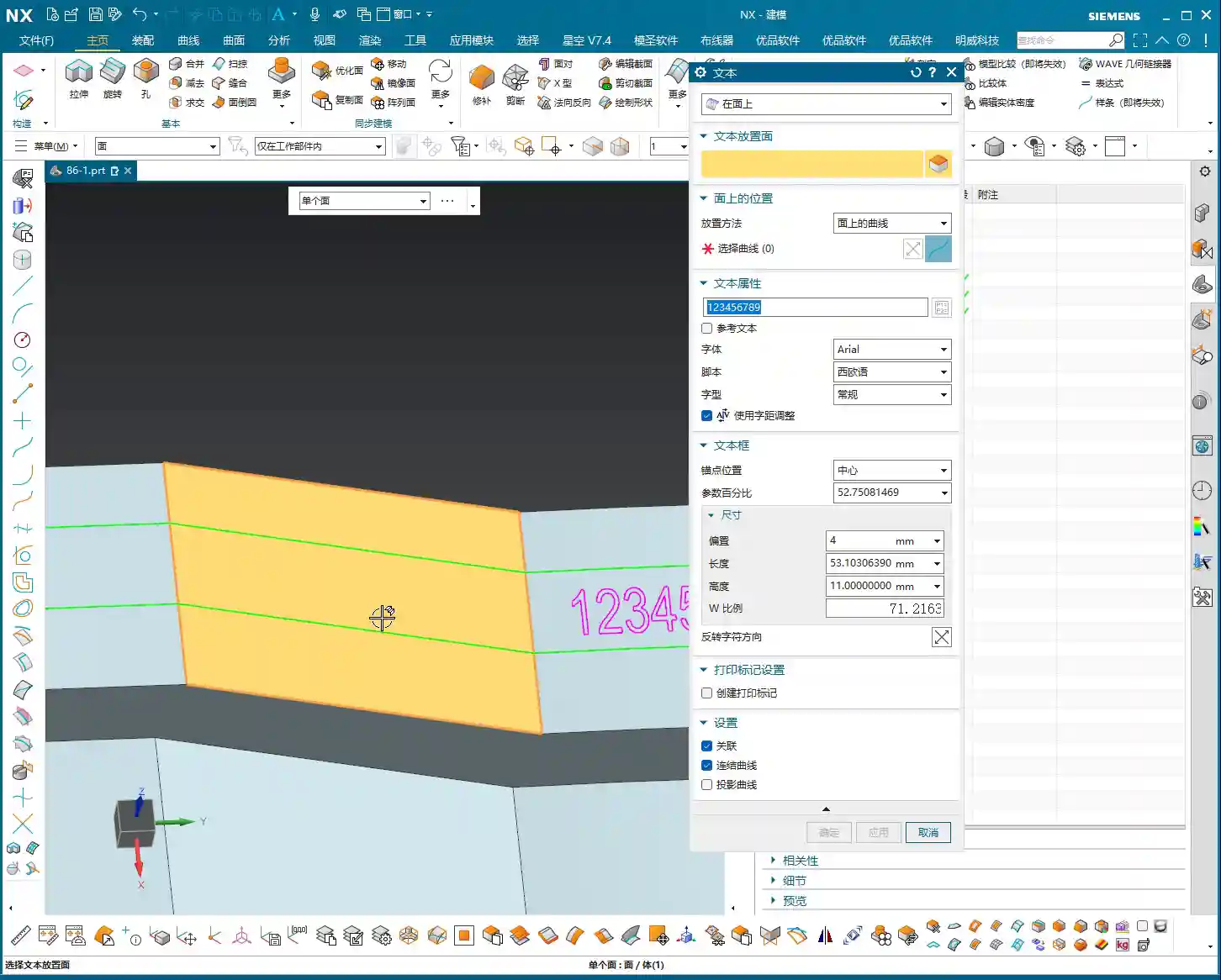
- Step One: Select the Machining Face. Tell the software which area you want to engrave on. Even if the face is curved or inclined, NX can handle it for you.
- Step Two: Select the Curve to Engrave. This curve can be one you’ve drawn on a surface, or a line from another plane; NX will help you project it onto your selected face for machining. Wrong direction? Just click ‘Reverse’ – no need to overcomplicate things.
Master Wang’s Tip: Remember, select the face first, then the curve; this is the operational logic in NX. Don’t try to do everything at once; take it one step at a time to stay steady. It’s the same principle as machining parts – you can’t mess up the sequence! Once you’ve selected the face and then the curve, even if that curve isn’t originally on the face, the software will “press” it onto the surface and engrave it for you. Now *that’s* practical application you won’t learn from textbooks.

Tooling and Parameters: The Art of “Micro-Management” in Practice

Selecting the Right Engraving Tool
Tools for engraving text and lines are typically quite small, often what we in the shop call “needle-point tools,” such as conical engraving tools with a diameter of 0.3mm to 0.5mm (approx. 0.012-0.020 inch). When selecting a tool, base your choice on the required engraving depth and width. The finer the tool, the more delicate the engraving, but its rigidity also decreases, so you need to pay close attention to the cutting parameters. Ensure your feed rate and spindle speed are well-matched. This area is prone to excessive tool loading or breakage, so don’t be stingy with the time; breaking a tool will cost you far more in the long run.

The Secret of “Negative Stock”: The Mystery of Depth Control
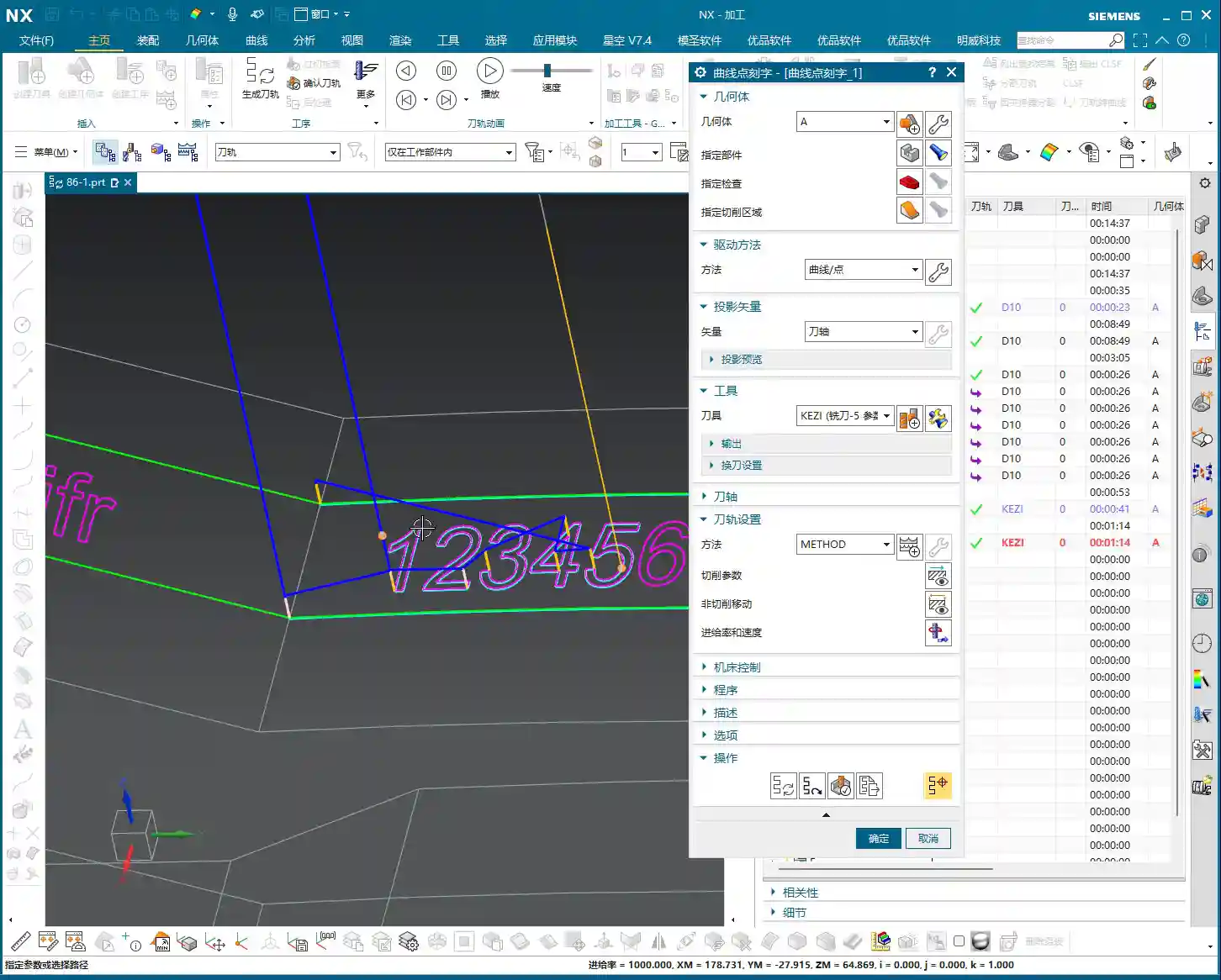
When using this function, you might encounter a “negative stock” warning. Don’t panic! It’s a little trick we leave when setting up templates.
Listen up: this “negative stock” means we instruct the tool to descend slightly deeper than the theoretical path to achieve the actual engraving depth. For example, a -0.1mm (approx. -0.004 inch) stock allowance set in the template means the tool will cut 0.1mm deeper than the surface. This way, you truly “engrave” rather than just scratching the surface. This is crucial for ensuring the depth and clarity of the engraving. In practice, this parameter needs to be flexibly adjusted based on the material, tool, and desired final effect. Don’t just rely on software simulations; observe the cutting sparks, listen to the cutting sound. Actual tool wear and machine accuracy will both affect the depth. When necessary, manually adjust the compensation; that ±0.005mm (approx. ±0.0002 inch) precision isn’t something software alone can guarantee.

Multiple Passes: Layered Progression for Fine Engraving
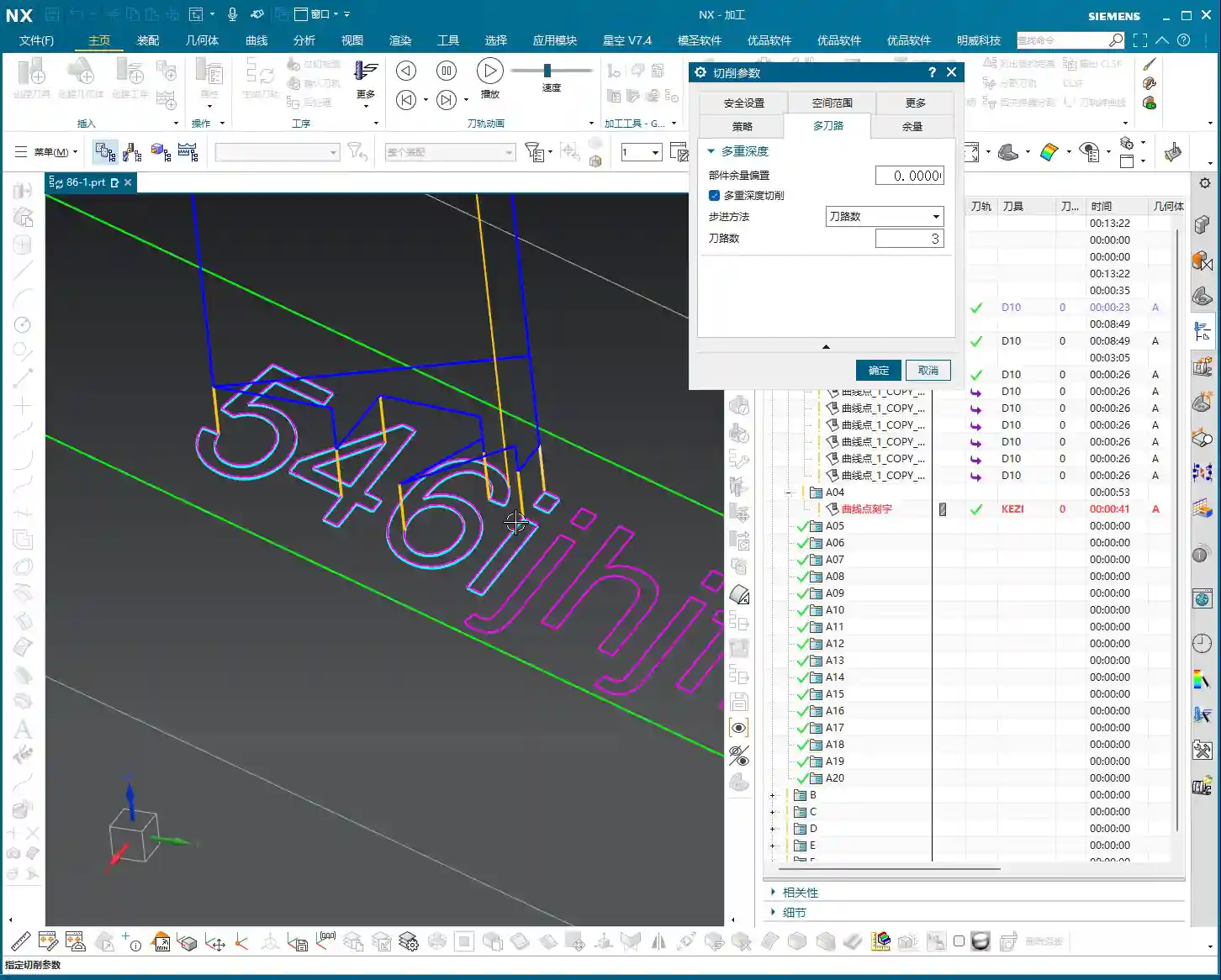
If deeper engraving is required or the material is particularly hard, you’ll need to use “multiple passes”. This is similar to roughing: divide the machining into layers, with a smaller **Depth of Cut (DOC)** each time, which both protects the tool and ensures machining quality.
For example, to engrave to a depth of 0.3mm (approx. 0.012 inch), set 3 passes, so each pass will have a **Depth of Cut (DOC)** of 0.1mm (approx. 0.004 inch). This ensures even tool load and smoother chip evacuation. Especially when machining challenging materials like titanium alloys or high-temperature nickel-based superalloys, multiple passes are absolutely essential. Remember, **finishing passes** are never a one-shot deal; you must proceed cautiously and steadily to produce quality parts, extend tool life, and save costs.
Deeper Understanding: Projection Vector and Multi-Axis Correlation
Here’s a quick note: this function also involves the concept of the “Projection Vector”. While we don’t often directly manipulate it in 3-axis machining, it’s a technology closely related to multi-axis machining, especially **4-axis and 5-axis programming**.
Its purpose is to define the direction from which the tool “sees” your curve, and then “projects” that curve onto the machining face. If you want to delve deeper into this, you can refer to the section on “Fixed Axis Surface Drive Application and Projection Vector Explanation” in my previous “4-Axis and 5-Axis Programming” course, typically found in the second or third lesson. Learning more never hurts; more skills mean more opportunities! While it’s used less frequently in 3-axis, understanding it will give you a clearer insight into how toolpaths are generated on complex surfaces, which helps you optimize toolpaths, reduce air cuts, and improve efficiency.
Summary: Pitfall Avoidance Guide
Pitfall Avoidance Guide
- Pitfall One: Selecting only the curve, not the face. The software will get confused! NX needs a clear “stage” to perform on, so always specify the machining face first. This is fundamental logic.
- Pitfall Two: Ignoring “negative stock.” Think engraving is just scratching the surface? That’s “tracing a line,” not “engraving!” Understand and properly set negative stock to ensure engraving depth. Different materials and hardness levels may require fine adjustments to the negative stock.
- Pitfall Three: Trying to cut everything in one go. For deep engraving or hard materials, don’t expect to finish in a single pass. Utilize multiple passes to protect your tools and improve surface quality. Don’t try to save a minute or two only to break a tool; the cost of repairing parts and replacing tools will be much greater.
- Pitfall Four: Approaching a 3D function with only 2D thinking. This “Point-on-Curve Engraving” feature was born for complex 3D surfaces. Treat it as an enhanced version of planar profile milling; once you shift your mindset, a whole new world opens up! This function is a critical step in boosting your ability to machine complex parts.
Alright, that’s all for today. Within NX’s Fixed Contour Milling, whether it’s Point-on-Curve, Boundary, Flowline, or Surface Drive, their core principles are interconnected. Observe more, practice more, think more, and you too can become a highly capable expert in the shop! Don’t just bury your head in programming; get down to the shop floor and observe the actual cutting conditions – *that’s* where true skill is forged!
👤 About the Author:
The author is a veteran CNC machining professional with 15 years of industry experience, specializing in UG NX programming. This article is an original work representing personal practical insights.
⚠️ Copyright Notice: Unauthorized reproduction or distribution without prior communication is strictly prohibited.
Leave a Reply