📝 Key Takeaways: In-Depth Analysis of Siemens NX Finishing Toolpath Strategies Hello everyone, this is Old Wang, or you can call me Master Wang. Today, we…
Hello everyone, this is Old Wang, or you can call me Master Wang. Today, we’re cutting the fluff and getting straight to the practical insights. In Siemens NX, finishing toolpath strategies are countless, but which ones genuinely deliver results and which are just flashy but useless? Listen up! Today, I’m going to clarify the practical experience I’ve accumulated over the years, especially regarding the nuances of “Steep First,” “Shallow First,” and “Alternating” machining.
Reciprocal Machining Mode: Efficiency First
In NX programming, when clearing residual material or performing large-area finish cuts, we encounter “One-Way” and “Reciprocal” modes. Don’t hesitate, Reciprocal mode is the preferred choice in most cases. Why? Because it maximizes tool utilization, reduces rapid moves (idle time), and boosts efficiency.

Why Reciprocal Mode is Commonly Used
In NX machining operations, such as roughing for corner cleanup or large-area face milling and surface milling, if Reciprocal mode can be used, I almost always use it. The tool makes a pass, cutting material; on the return pass, it continues cutting. Unlike One-Way, where it cuts on one pass and the return is a rapid move, wasting precious time. In our line of work, every second counts. Saving one rapid move, multiplied over time, translates to profit. That’s why Reciprocal mode is used far more than One-Way for material removal and finishing. This should be self-evident.
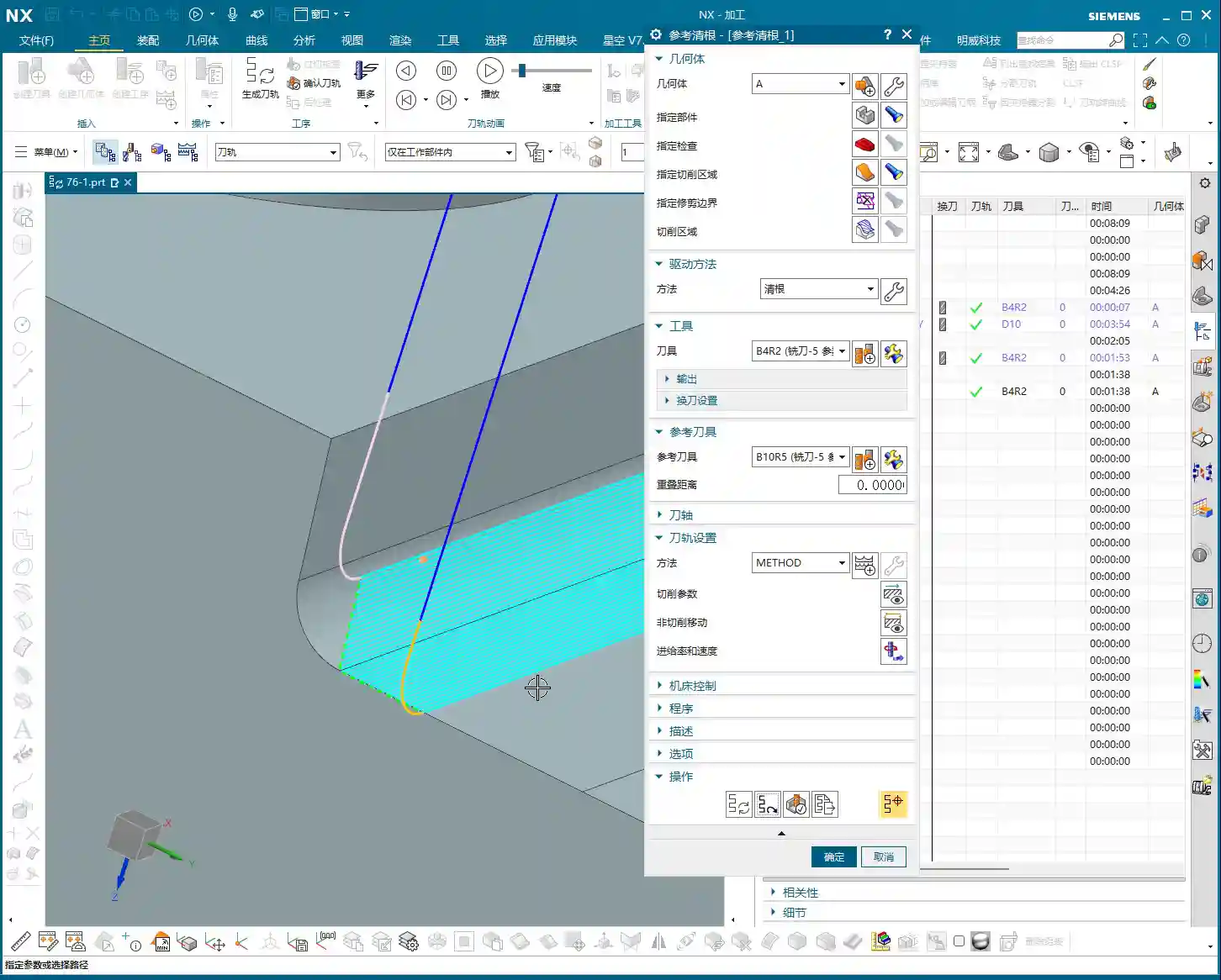
Steep Area Strategies: Steep First vs. Shallow First in Practice

Next up are the “Steep First” and “Shallow First” strategies. These are settings in NX for the machining order of steep and shallow areas on a workpiece. Sounds simple, but if used incorrectly, it can severely reduce tool life, lead to tool breakage, or scrap parts. This is serious business!
Steep First Strategy: Tackling Steep Surfaces
The “Steep Area First” strategy, as the name implies, means prioritizing machining of areas with a significant slope (e.g., steep surfaces exceeding 30-45 degrees), and then addressing the shallower areas. In practical application, if your workpiece primarily features curved surfaces with noticeable slopes, especially those where steep faces make up a larger proportion, using the “Steep First” strategy is often more effective. It allows the tool to tackle the most challenging “hard spots” first under stable cutting conditions, reducing vibration and tool wear in subsequent operations.
Remember, don’t just look at how nice the simulation in NX looks. Focus on the actual cutting sparks and sound from the machine. If the sparks are consistent and the sound is uniform, your toolpath is fine. If the sparks fluctuate wildly or the sound is occasionally harsh, chances are your strategy is wrong, or your parameters aren’t tuned correctly.
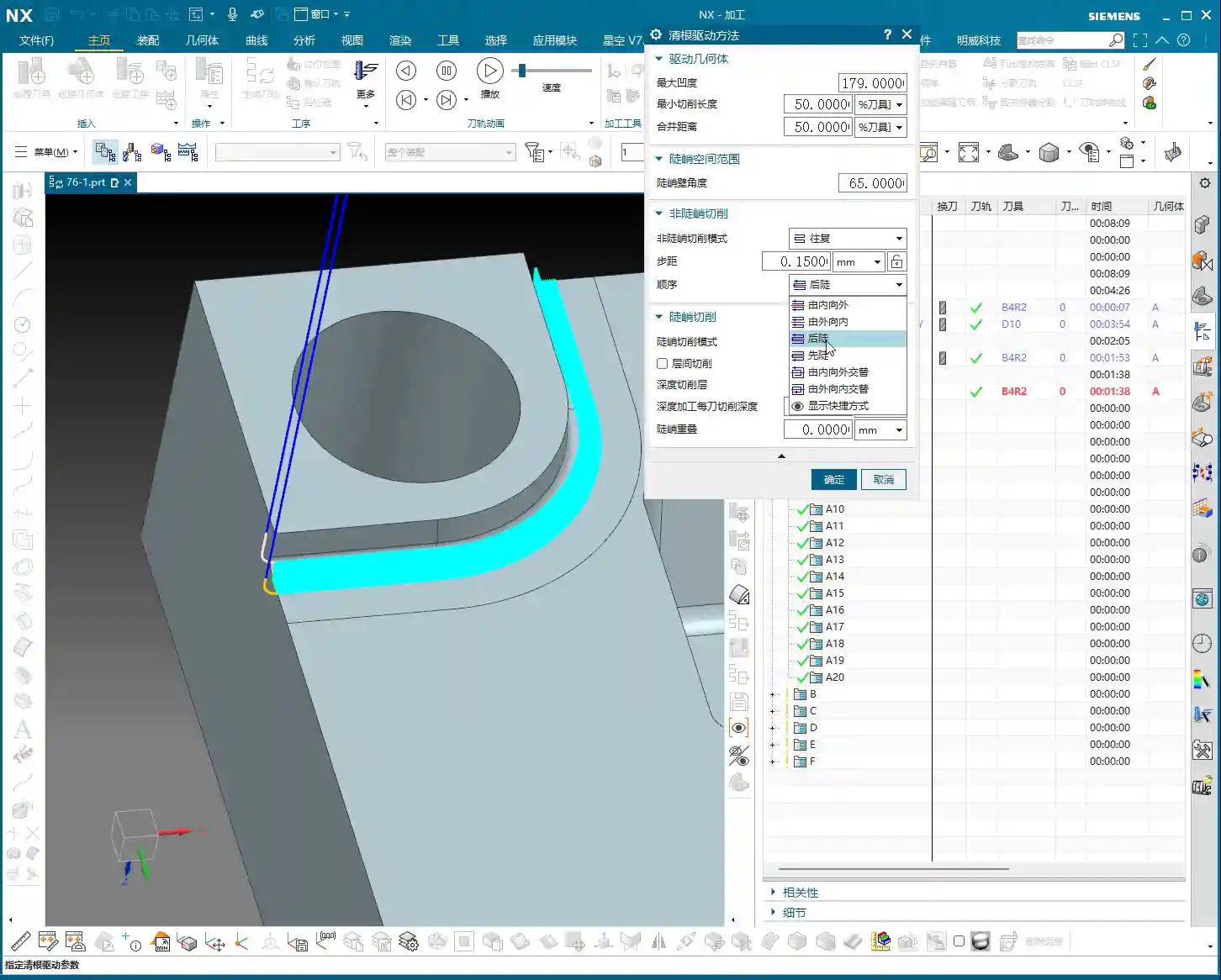

Shallow First Strategy: Processing Shallow Surfaces
The “Shallow Area First” strategy, also known as “Non-Steep Area First” or “Flat Area First,” processes the shallow areas of the workpiece first, then the steep areas. When is this strategy useful? Let me give you an example: if the workpiece is a cavity with straight, vertical walls or similar features, choosing “Shallow First” is generally better. Why? It starts machining from the bottom or shallow areas, ensuring the initial cut is stable, and then proceeds layer by layer upwards (or outwards). This is like a dynamic cutting process where material removal for each layer is quite uniform, preventing the tool from initially “plowing” into excessively thick material. This consistent chip load is especially critical for tool life when machining challenging materials like titanium alloys or high-temperature nickel-based alloys.
Which one to use isn’t absolute; it depends on your part’s geometric features. There’s no single best strategy, only the most suitable one. This is practical experience; you won’t always find such detailed explanations in textbooks.
Alternating Machining Strategies: The Nuances of Out-to-In vs. In-to-Out

The “Out-to-In Alternating” and “In-to-Out Alternating” strategies in NX play a crucial role in finishing, especially during Corner Cleanup. These two strategies primarily control the tool’s machining sequence within the cutting area: whether it starts from the periphery and “peels” inwards layer by layer, or starts from the interior and “expands” outwards layer by layer.
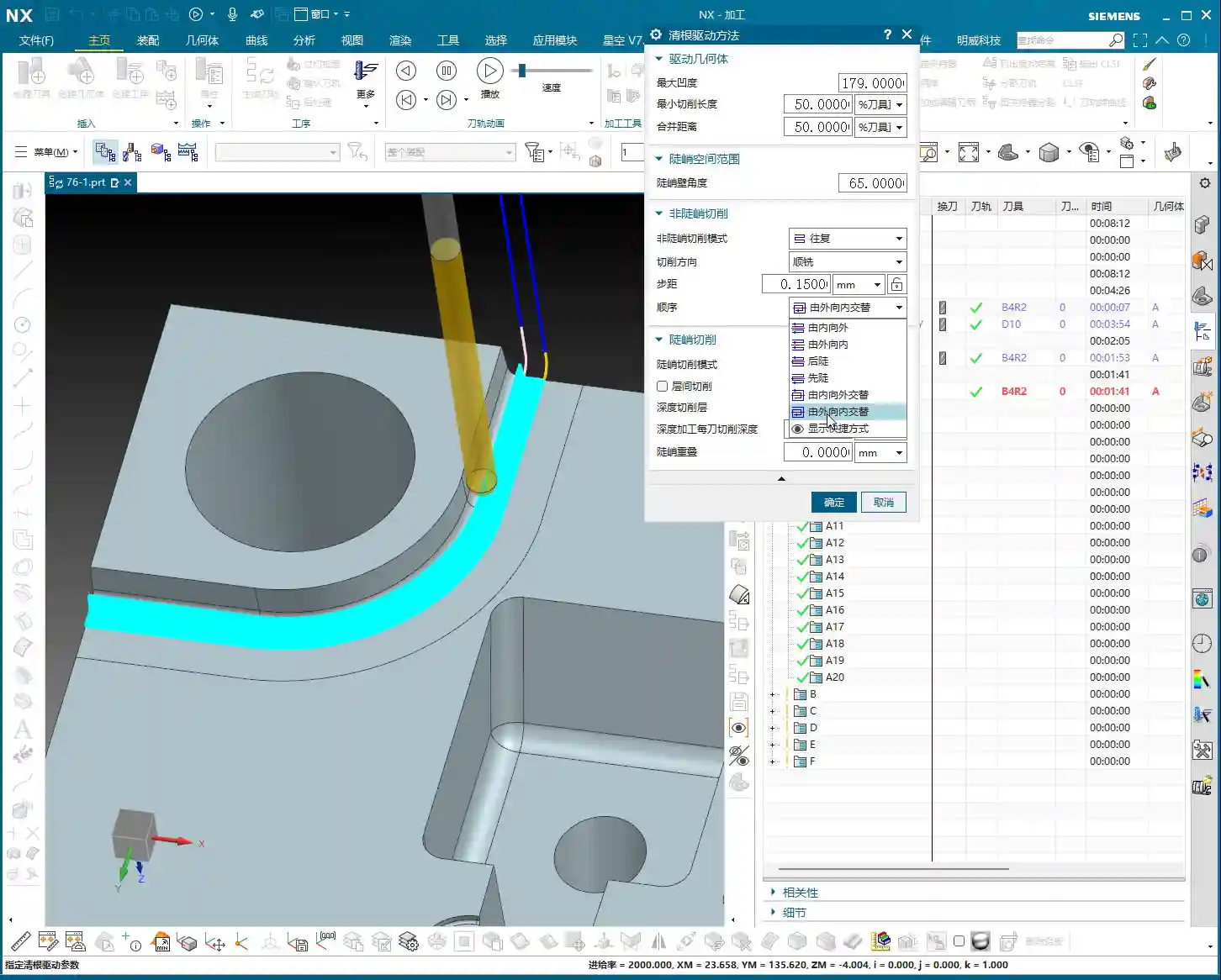
Out-to-In Alternating: The Corner Cleanup Ace
The “Out-to-In Alternating” strategy – I’ll say it – is absolutely one of the most commonly used and effective strategies for our corner cleanup operations! It initiates the cut from the outermost edge of the workpiece’s machining area, then progressively cuts inward, while alternating during the process. What does this mean? It makes one cut on the outermost path, then jumps to a slightly inner position for another cut, then jumps back, and so on, moving further inward. The benefits of this machining approach are:
- Uniform Chip Load: The tool removes a very consistent amount of material with each cut, avoiding sudden heavy or light loads. This is exceptionally beneficial for maintaining tool stability and extending tool life.
- Excellent Surface Quality: Due to the smooth cutting process and uniform material removal, the resulting surface quality is particularly good, less prone to tool marks or chatter marks.
- Thorough Corner Cleanup: It can gradually and completely remove residual material from the corners, leaving no hard spots.
I use this “Out-to-In Alternating” strategy for about seventy to eighty percent of my finishing passes, especially for mold corner cleanup. Its uniform toolpath distribution and consistent material removal are the gold standard in our actual production.
In-to-Out Alternating: Use with Caution
The “In-to-Out Alternating” strategy, on the other hand, starts cutting from the interior of the machining area and gradually expands outwards. I use this strategy relatively rarely; in fact, I’d say it’s not recommended for most finishing corner cleanup scenarios.
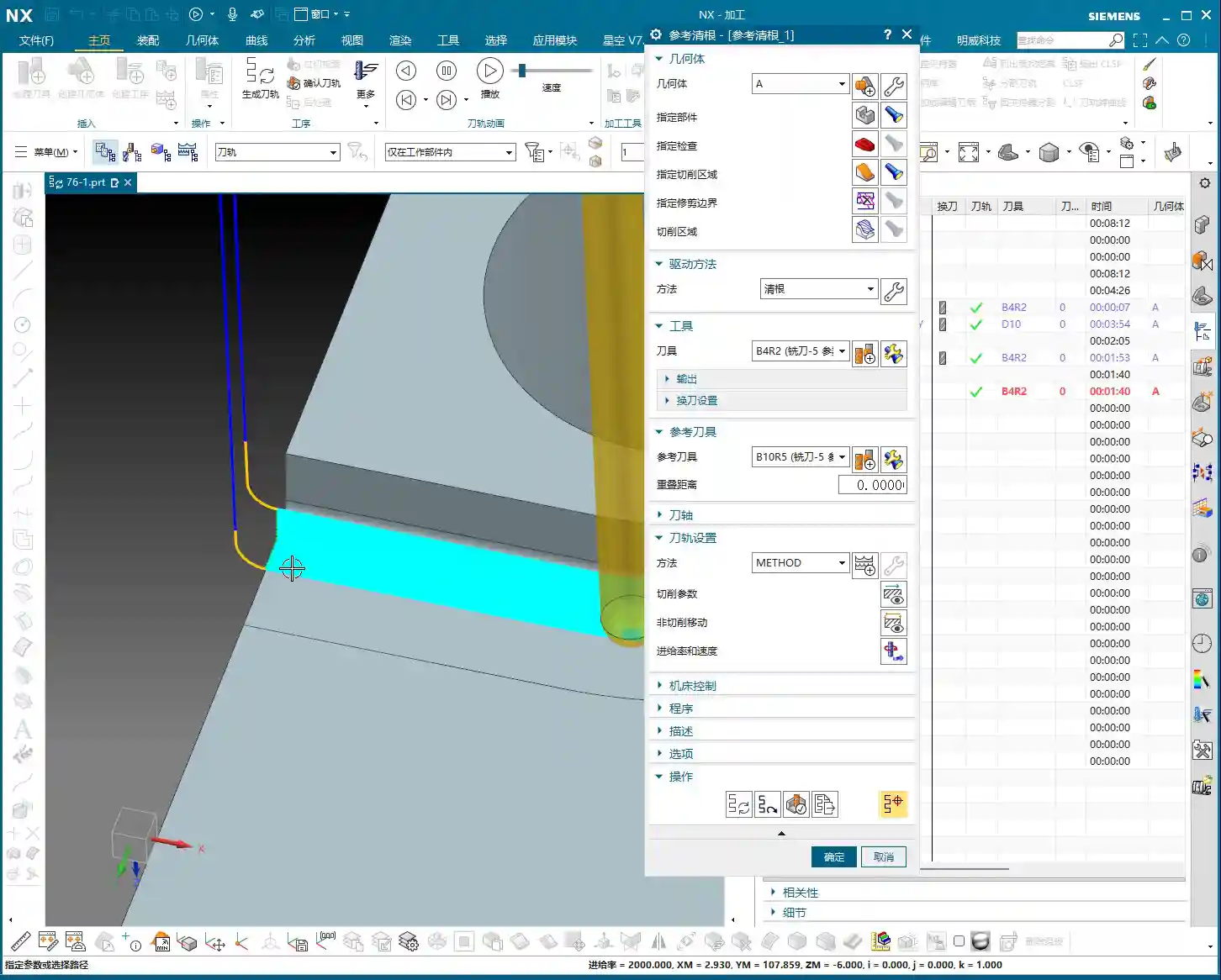
Imagine if there’s residual material at the bottom of a cavity, and your initial cut starts from the innermost point and expands outwards. That first cut could very likely engage a significant amount of material, leading to an instantaneous heavy chip load. As I said in my audio earlier, “the very first cut finishes the entire corner of our part”, which indicates the tool is subjected to immense impact, potentially causing tool breakage, chatter, or even scrapping the part. Of course, this doesn’t mean it’s entirely useless. In certain special part geometries or specific process requirements, it might occasionally come in handy. But in production, we prioritize stability and reliability. So, if you’re unsure about this strategy, try to avoid it if possible, or at least run multiple simulations to check if the chip load and toolpath are reasonable. Don’t just rely on software simulations; pay attention to cutting sparks and cutting forces!
Summary: Pitfall Avoidance Guide
Listen up, junior engineers, everything I’ve shared today is hard-earned experience. I hope it helps you avoid common pitfalls:
- Prioritize Reciprocal Mode: Whenever conditions allow, use reciprocal mode for finishing and large-area machining. Saving rapid moves means saving money.
- Steep First and Shallow First: Be Flexible: There’s no one-size-fits-all. For workpieces with overall significant slopes, consider “Steep First.” For workpieces with vertical walls or similar straight-up-and-down features, “Shallow First” is often more stable. You need to analyze how your tool will dynamically engage the material to ensure stable cutting.
- “Out-to-In Alternating” is the Ace for Finishing Corner Cleanup: It’s virtually applicable to all situations requiring precise corner cleanup. It ensures uniform cutting, improving surface quality and tool life. I personally highly recommend it, and it’s my most frequently used strategy.
- Use “In-to-Out Alternating” with Caution: Unless you have a very clear justification and thorough verification, this strategy can easily lead to excessive chip load on the initial cut in finishing, causing problems. Newcomers should especially avoid it.
- Don’t Blindly Trust Software Simulations: Software is static; machines and materials are dynamic. The ultimate judgment criteria are the actual machine’s cutting sound, sparks, tool wear, and the final part accuracy and surface quality. Listen more, watch more, feel more – these “unwritten” practical tips are your real assets.
Our profession is all about experience. Practice more, think more, and summarize your findings. Ponder these toolpath strategies carefully, and they will help you navigate NX programming with fewer headaches and produce more high-quality parts.
👤 About the Author:
The author is a veteran CNC machining professional with 15 years of industry experience, specializing in UG NX programming. This article is an original work representing personal practical insights.
⚠️ Copyright Notice: Unauthorized reproduction or distribution without prior communication is strictly prohibited.
Leave a Reply