📝 Key Takeaways: Master Wang shares practical NX Corner Cleanup techniques. From selecting a reference tool for corner cleanup to various cutting modes (Zigzag, Follow Part Outline, Zigzag-Up, Steep/Non-Steep), he thoroughly explains the characteristics and applicable scenarios for each toolpath. He specifically emphasizes combining “Alternate from Outside-In” with the “Smoothness” function to ensure excellent surface finish at part corner radii. Learn to identify yellow toolpath regions to avoid misjudgments and truly master the strategies not found in textbooks.
The Core of Corner Cleanup — Understanding Reference Tool Corner Cleanup
What is Reference Tool Corner Cleanup?
Master Wang: Folks, it’s Master Wang here. Today, let’s talk about “Corner Cleanup” in NX. Don’t underestimate it; many quality issues in the workshop stem from these hard-to-reach corner radii. Our commonly used “Reference Tool Corner Cleanup,” as the name suggests, uses a “reference tool” larger than the current tool to identify areas that the previous tool couldn’t reach, and then a smaller tool is used for cleanup. This is a critical, core function in our NX programming, and you must master it thoroughly!
Part Selection and Initial Setup
Master Wang: Listen up! Step one in the operation is to first insert the “Operation,” then select “Reference Tool Corner Cleanup.” This is common knowledge, I’ve explained it countless times before. But there are two points you need to pay attention to:
- **Blank Definition**: Before starting any job, you **MUST define the blank clearly**. Otherwise, once the toolpath is calculated, you’ll either have an overcut or air cutting. Don’t make rookie mistakes!
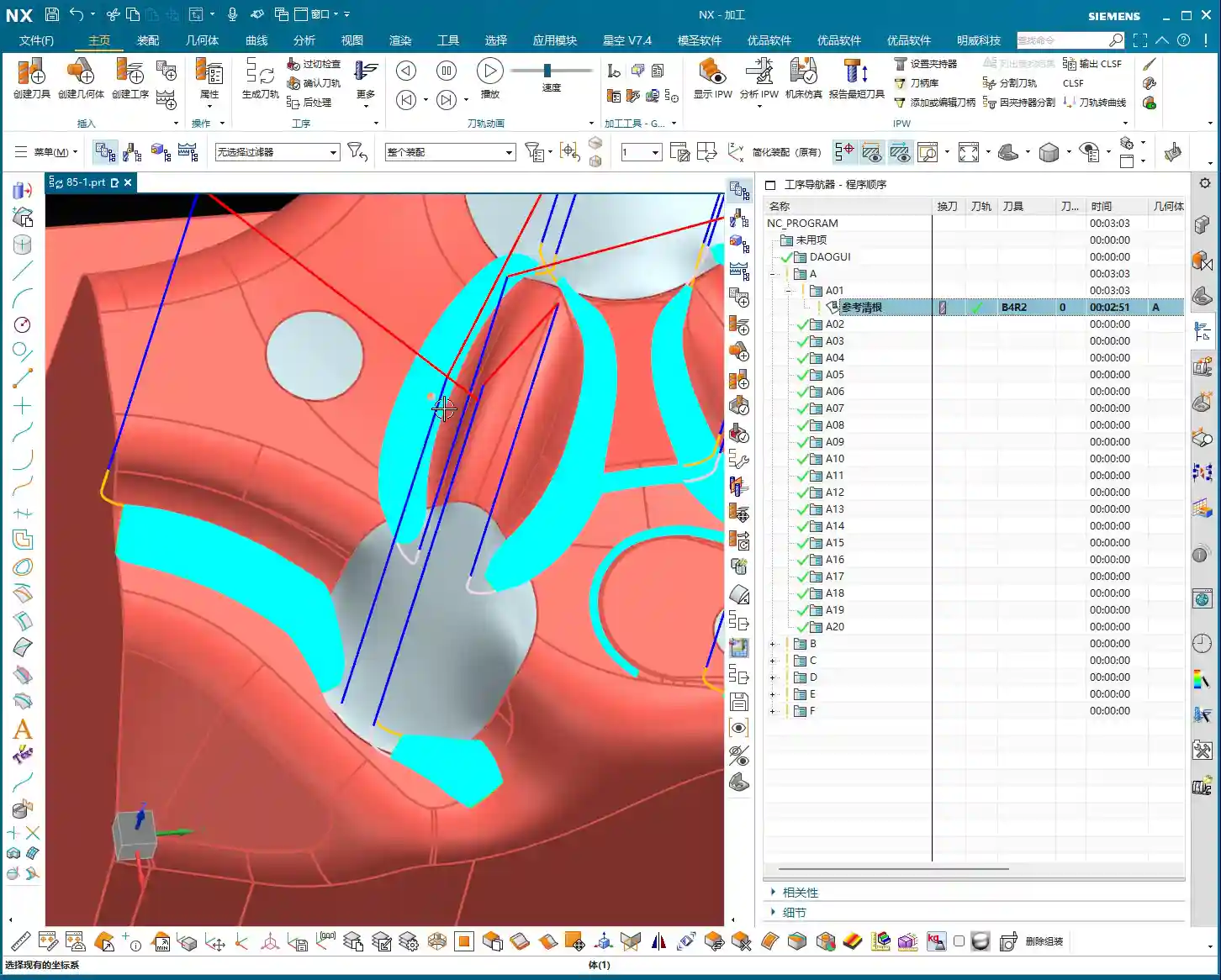
- **Machining Area Selection**: When you encounter a part like ours, which has “sheet bodies,” don’t be foolish and select everything directly. You need to switch to “Only Select Faces” and then use “Box Selection” mode. This ensures you select the correct area, neither missing nor over-selecting. If you select too much, the program might calculate a bunch of yellow lines. Don’t panic, it’s not a program error, I’ll explain what’s happening later.
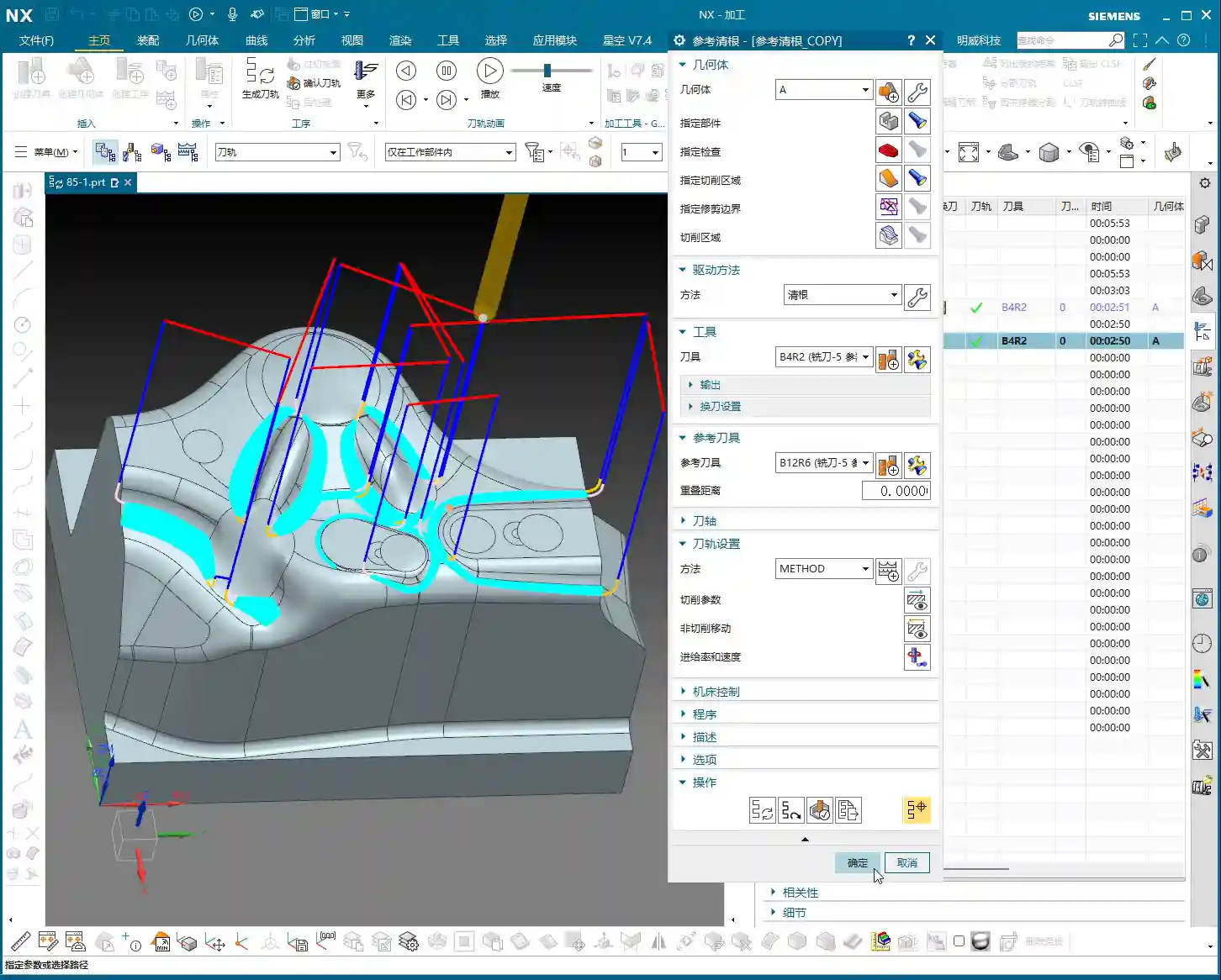
- **Tool Selection**: Which tool to choose? Youngster, for corner cleanup, just pick a common end mill that can reach into the corner radius. Here, the **specific tool model isn’t the main point; the key lies in the toolpath strategy and parameter settings**. That’s what determines the quality of your part!

In-Depth Analysis of Corner Cleanup Strategies
“Zigzag” Milling: The Foundation for Reliable Stock Removal
Master Wang: The program we initially run often defaults to “Zigzag” milling. Simply put, this mode makes the tool move back and forth within the machining area, like plowing a field. It’s stable and removes material, but there’s a problem: the **”tool marks” can be quite noticeable**, especially on contoured surfaces. For parts requiring a high surface finish, you’ll need to look at other strategies. This is generally the entry-level method for corner cleanup; it gets the material out, but to achieve a smooth finish, you need to dig deeper.

“Steep Up” Strategy: The Bottom-Up Finishing Approach
Master Wang: “Steep Up” is the opposite of “Steep Down.” “Steep Down” cuts from top to bottom, using the tool’s bottom edge; “Steep Up,” on the other hand, **cuts from bottom to top, layer by layer upwards**. With this machining method, the tool first reaches the bottom, then lifts and cuts upwards from the bottom. This results in stable cutting forces and good chip evacuation. Let me tell you a trick: for areas with **small fillet radii** at the bottom, or where high surface finish is required on side walls, “Steep Up” can effectively reduce tool marks. This is because the final pass will lift from the bottom, allowing the tool to exit more smoothly, naturally leading to a better surface finish.
“Follow Part Outline”: Flexible Approach for Sidewall Corner Cleanup
Master Wang: Now, let’s talk about “Follow Part Outline.” As the name implies, this mode means the **tool’s side cutting edge follows the boundary, primarily addressing corner cleanup in sidewall regions**. With this method, the toolpath precisely conforms to the part’s boundaries, making it particularly effective for narrow, complex corner radii. For instance, if you need to clean up deep grooves or irregular slots, this method can thoroughly clean out dead spots. However, it also has a drawback: if the entire area is machined with this mode, efficiency might not be as high as “Zigzag.” So, you have to tailor your approach and not apply it indiscriminately.

“Zigzag-Up”: An Efficient Strategy for Smooth Surface Corner Cleanup
Master Wang: “Zigzag-Up” is a commonly used and highly effective strategy for processing contoured surfaces during corner cleanup. It combines the efficiency of “Zigzag” with the smoothness of “Up” cutting. Especially when combined with the **”Alternate from Outside-In”** cutting strategy, the results are even better! It starts from the periphery of the machining area and cuts inwards in a spiral, finally converging to the center, much like a snail shell. This approach **allows the cutting force to gradually decrease from outside to inside, which helps maintain tool life and machining stability**. Especially during finishing passes, it can produce perfectly round, smooth corner radii. For our contoured part today, this method is particularly suitable!
Key Parameters and Practical Tips

The ‘Wrench’ Icon in Fixed Axis Contour Milling Parameters
Master Wang: In NX, everything related to “Fixed Axis Contour Milling” has critical settings under that “wrench icon.” Our corner cleanup also falls into this category. You need to thoroughly understand the parameters inside, such as “Non-Steep Cutting” and “Steep Cutting” – these two are real gems.
- **Non-Steep Cutting**: Generally corresponds to **gentle areas with a slope less than a certain angle (e.g., 30 degrees or 45 degrees, which can be customized)**. The toolpath here is usually Zigzag or Follow Boundary.
- **Steep Cutting**: Corresponds to **steep areas where the slope is greater than this angle**. Toolpaths in these areas are often Z-level milling or cut from bottom-up.
The cutting methods and parameter settings for these two regions directly impact machining efficiency and surface quality. For our case today, which involves many contoured surfaces, the “Non-Steep Cutting” method will be used frequently. Remember, without special requirements, often you can just set it to **”Same as Non-Steep.”** This saves effort and ensures the same machining effect as in non-steep regions.
“Smoothness” and “Stepover”: Secrets to Improving Surface Quality
Master Wang: When it comes to surface finish, there are two parameters you absolutely must keep an eye on: **”Smoothness”** and **”Stepover.”**
- **Smoothness**: Especially when using “Zigzag-Up” for corner cleanup, if the toolpath doesn’t look “rounded” enough, with somewhat “sharp corners,” chances are your “Smoothness” isn’t activated. Go immediately to “Non-Cutting Moves” and check the “Smoothness” box! Activating this function makes the tool’s engage/retract moves and connection paths much smoother, naturally resulting in a shiny part surface. This is **critical for the final “aesthetic quality” of contoured corner radii**!
- **Stepover**: This controls the tool’s radial engagement. Generally, if you reduce the stepover, the surface becomes smoother. But on the flip side, machining time increases, and so does cost. So, it’s a balance point. However, in “Smoothness” mode, to make the toolpath connections look better, sometimes we can increase the “Maximum Stepover,” for example, to **2000% or even 5000%**. This gives the software greater freedom to optimize the path, making it look as if it were milled in a single pass – absolutely beautiful. This is a trade secret you won’t find in textbooks; it allows your program to ensure smoothness while maintaining a certain level of efficiency!
Summary: Pitfall Avoidance Guide
Master Wang: Alright, that’s all for today’s corner cleanup essentials. Remember my words, these are hard-earned lessons from the shop floor.
- **Always Define the Blank**: Don’t treat this as a minor detail. If the blank isn’t defined correctly, all subsequent toolpaths are useless, leading to overcuts and ruined parts, or air cutting that wastes time. This is fundamental, yet often overlooked.
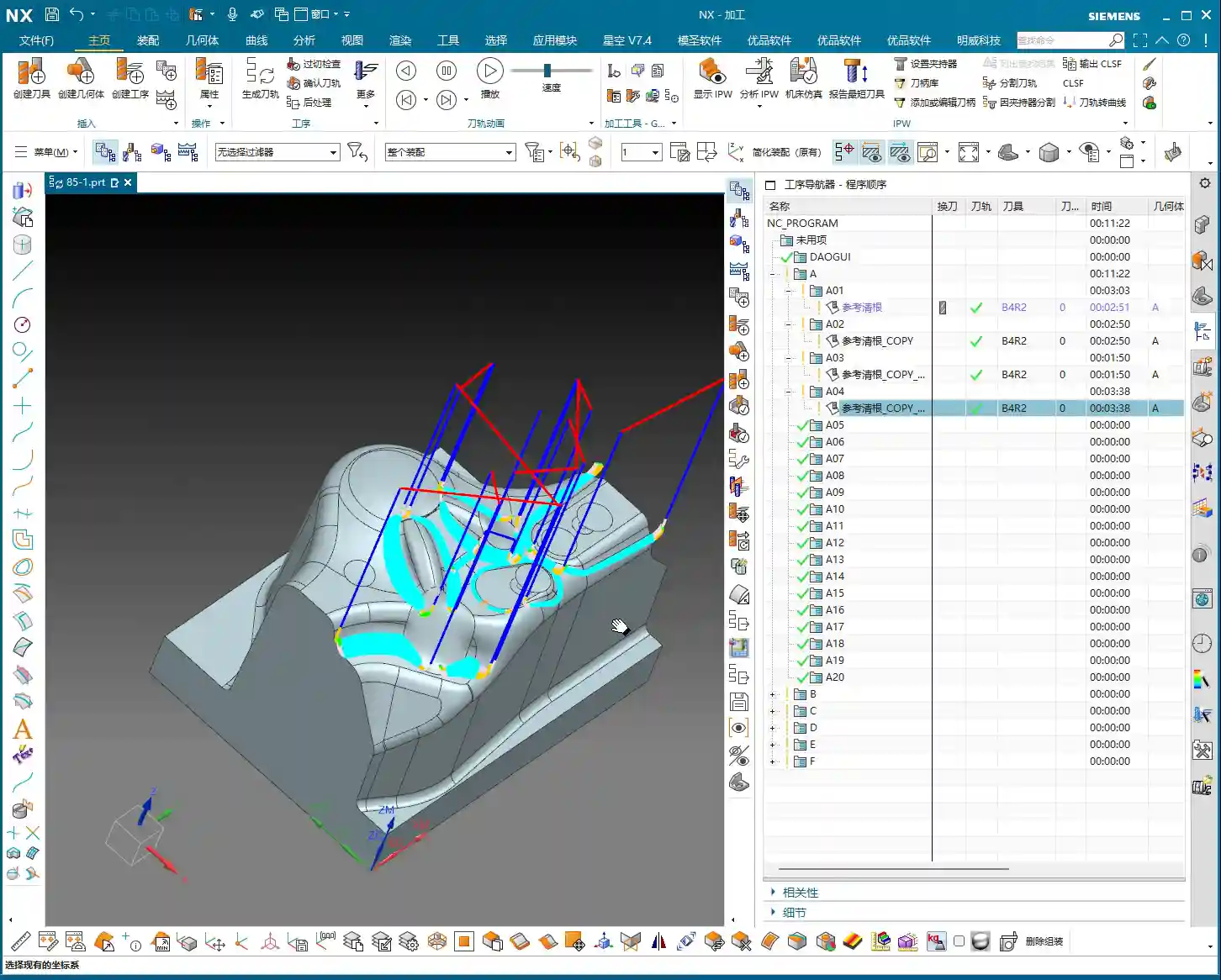
- **The Truth About Yellow Toolpath Regions**: When NX calculates toolpaths, it sometimes displays **yellow toolpath regions**. Remember, this is not a program error, but rather NX telling you that this is the tool’s **”machining range” or “intersection area,”** typically used to mark the maximum range that the current tool can cut. You simply need to **”regenerate” the toolpath**, and these yellow regions will disappear, turning into normal blue toolpaths. Don’t hit cancel as soon as you see yellow lines – that’s a misjudgment and a waste of time!
- **Matching Strategies to Part Geometry**: Corner cleanup strategies are diverse; there’s no single “best” one, only the most suitable. For parts with many contoured surfaces and high precision requirements, consider “Zigzag-Up” combined with “Alternate from Outside-In”; for deep cavities and bottom corner radii, use “Steep Up”; for narrow sidewalls, use “Follow Part Outline.” You must flexibly choose based on the part’s shape, material characteristics, and precision requirements.
- **Balancing Smoothness and Efficiency**: Blindly pursuing smoothness by setting the stepover to the minimum will only extend your machining time indefinitely and increase costs. Learn to combine the “Smoothness” function with reasonable adjustments to “Maximum Stepover.” This way, you can improve efficiency while ensuring quality – that’s the wisdom of an experienced professional!
- **Don’t Just Rely on Software Simulation, Watch the Cutting Action!**: The best program still has to run on the machine. Cutting sparks, chip formation, and tool wear – these are the most authentic feedbacks from the shop floor. No matter how beautiful the software simulation, it cannot replace your keen eye and years of accumulated experience!
Think these things over carefully and master them, and you’ll be well on your way to becoming a true master machinist!
👤 About the Author:
The author is a veteran CNC machining professional with 15 years of industry experience, specializing in UG NX programming. This article is an original work representing personal practical insights.
⚠️ Copyright Notice: Unauthorized reproduction or distribution without prior communication is strictly prohibited.
Leave a Reply